Tutorials › 6
Use your own Vectric post
If NativeCAM has no post for your controller, it can run the Vectric .pp file your machine's maker publishes for VCarve or Aspire as a template.
-
Find your post
Machine makers usually publish a Vectric post for their machines, and VCarve or Aspire users already have one installed. NativeCAM doesn't ship or share anyone's posts; you supply your own, and the project keeps a private copy.
-
Load it
Select Material & Machine, scroll to G-code Output, and click Use a Vectric Post…. Choose the
.ppfile. -
Review what it writes
Before you use it, a sheet shows what the post writes (units, file extension, line endings, arcs, tool changes) and compares its output with NativeCAM's own post on the acceptance test program, listing the lines that differ.
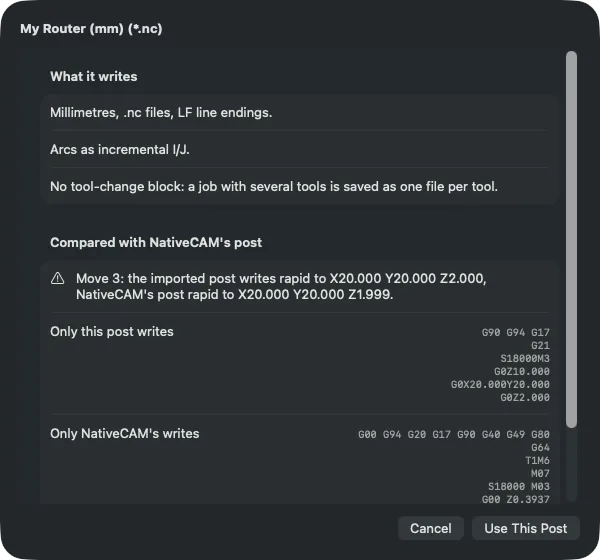
An example post written for this tutorial. With no tool-change block, a job with several tools is saved as one file per tool. Read the differences carefully. Here, the example post writes millimetres (
G21) where the project's machine runs in inches (G20), and leaves out the safety line and tool change NativeCAM's Mach4 post writes. That's exactly the kind of thing to catch before the file reaches a machine. -
Use it, then check
Click Use This Post. NativeCAM fills the post's header, tool-change, spindle and move blocks and its variable formats. Arcs the post can't express are written as short lines, and a post with no tool-change block saves a file per tool.
Every exported file still goes through the export checks, which use the controller's rules when NativeCAM knows them. Projects with an imported post are saved as format 2.
What's refused. Posts that need rotary wrapping or inverse-time feeds are refused, with the reason. Run the acceptance test on your machine before relying on any post, imported or built in.